















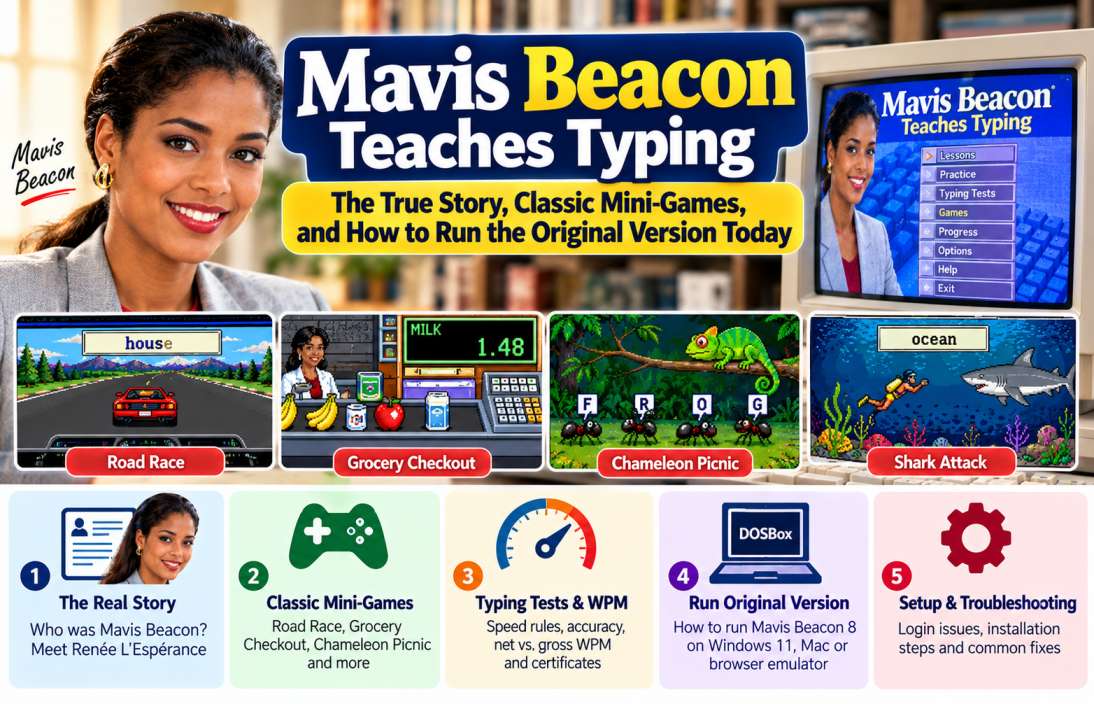
Do you remember learning to type with Mavis Beacon? For many people, this software was their first introduction to touch typing. Its lessons, typing tests, and arcade-style mini-games made keyboard practice more enjoyable.
First released in 1987, Mavis Beacon Teaches Typing became one of the best-known educational computer programs. Students used it to learn finger placement, improve typing speed, and reduce mistakes.
But there is an interesting story behind the famous typing instructor. Mavis Beacon never existed as a real person. Her face belonged to a model named Renée L’Espérance, whose photograph became one of the most recognised images in computer education.
This guide explores the Mavis Beacon’s history, classic mini-games, typing tests, certificate features, and ways to run older editions on Windows 11 and Mac computers.
The Untold Origin Story: Who Was the Real Mavis Beacon?
Mavis Beacon was a fictional character created by The Software Toolworks for its typing education software.
The company wanted to give its typing program a friendly face. Most computer programs at the time had plain packaging and technical names. A familiar instructor could make the learning process feel more personal.
The idea worked. Many users believed Mavis was a real typing teacher who had developed the lessons and appeared in the software.
Creation of an EdTech Icon by The Software Toolworks (1987)
The Software Toolworks released Mavis Beacon Teaches Typing in 1987.
Three important people were involved in the company’s early development and the creation story:
- Walt Bilofsky: Founded Software Toolworks and led its software development work.
- Joe Abrams: Worked with Bilofsky on the company’s commercial growth and product ideas.
- Les Crane: A former talk-show host who joined the business and brought strong marketing experience.
Abrams wanted to give the typing program a recognisable personality. Crane supported the idea of using a real model’s photograph to create a fictional instructor.
The result was Mavis Beacon.
The name itself had a thoughtful origin. Les Crane chose Mavis after singer Mavis Staples. The word Beacon referred to a guiding light for people learning to type.
The software launched in 1987 and gained attention for its friendly presentation and practical lessons. According to The Washington Post, it sold more than 10 million copies over its history.
Renée L’Espérance: The Woman Behind the Cover Art
The woman behind Mavis Beacon’s famous image was Renée L’Espérance, a Haitian-born model who worked at a Saks Fifth Avenue perfume counter in Beverly Hills.
According to Joe Abrams, Les Crane noticed her during a visit to the store. Crane felt she would suit the typing instructor image, despite her long fingernails and limited English.
The company approached her the next day.
She reportedly received $500 and a new suit for a photo shoot that took less than one day. The photographs were taken near the Century City towers in Los Angeles.
Her photograph became the face of a major educational software brand. But L’Espérance did not become a public celebrity. She returned to the Caribbean after the shoot and kept a low profile.
The documentary Seeking Mavis Beacon, released in 2024, explores her identity, privacy, and the lasting impact of the fictional character. It raises questions about representation and the way companies use real people’s images to build fictional brands.
So, is Mavis Beacon a real person?
No. Mavis was fictional. Renée L’Espérance was the real woman whose image made the character famous.
Retro Mini-Games That Made Typing Fun
One reason Mavis Beacon became popular was its use of mini-games. Instead of copying long paragraphs all the time, students could practise typing through short games.
The games made speed and accuracy feel like part of a challenge. Several classic titles appeared in Version 8 and later editions.
Not every Mavis Beacon release contained the same games. The exact collection depends on the edition.
The Classic Road Race (Car Racing Game)
Road Race was one of the most memorable Mavis Beacon games.
You controlled a racing car and competed against another vehicle. Words appeared on the dashboard. You had to type them correctly and quickly to keep your car moving.
The game linked typing speed with progress on the track.
How Road Race worked:
- Start the race.
- Watch the word displayed on the screen.
- Type the word correctly.
- Your car moves forward as you complete the words.
- Keep typing accurately to stay ahead of the rival car.
- Try to finish the race without making too many mistakes.
Some versions displayed bug splats on the windscreen when players made errors. Too many mistakes could make it hard to see the road.
The game taught an important lesson: fast typing is useful, but accuracy matters just as much.
Grocery Checkout: Learning the Numeric Keypad
Check-Out Time was a different kind of typing challenge.
Instead of typing words, you worked at a virtual supermarket checkout. Grocery items moved along a conveyor belt, and you had to enter their displayed prices using the numeric keypad.
Each item tested your ability to enter numbers quickly.
| Game Element | Typing Skill |
|---|---|
| Entering item prices | Numeric keypad speed |
| Pressing Enter | Key control |
| Correct price entry | Accuracy |
| Fast checkout | Numeric typing rhythm |
A mistake could cause an item to fall from the conveyor belt. Repeated mistakes could end the game.
This mini-game was useful for students who needed better numeric typing skills for office work and data entry.
Chameleon Picnic: Improving Letter Recognition
Chameleon Picnic turned individual letters into a small arcade challenge.
Ants moved across the screen. Each ant carried a letter from a word. Your job was to type the correct letter before the ant escaped.
A correct entry allowed the chameleon to catch the ant. A missed letter gave the ant a chance to escape.
The game helped practise:
- Letter recognition
- Finger placement
- Repeated key combinations
- Typing rhythm
- Accuracy under time pressure
It was a clever way to make individual letter practice more interesting.
Shark Attack: Typing Under Pressure
Shark Attack added a sense of urgency.
The player was underwater and needed to type words to escape a pursuing shark. Correct and fast typing helped the character move towards safety and reach the treasure.
Errors could appear as bug splats on the player’s goggles. Slow typing allowed the shark to get closer.
This game encouraged students to type without looking down at the keyboard.
Other Classic Mavis Beacon Mini-Games
Version 8 included several other games, depending on the edition.
| Mini-Game | Main Activity | Skill Practised |
|---|---|---|
| Road Race | Type words to race | Speed and accuracy |
| Check-Out Time | Enter grocery prices | Ten-key number entry |
| Chameleon Picnic | Type letters carried by ants | Letter recognition |
| Shark Attack | Type words to escape | Speed under pressure |
| Penguin Crossing | Type words to move a penguin | Word recognition |
| Space Junk | Type to destroy incoming objects | Quick word entry |
| Rag Time | Musical typing challenge | Timing and rhythm |
These titles are documented in the Version 8 game listing.
Mavis Beacon Typing Tests and WPM Scoring Rules
Games were only one part of Mavis Beacon. The software included structured lessons, typing tests, progress tracking, and skill assessments.
Students could check how quickly they typed and how many errors they made.
How Mavis Beacon Calculated Gross WPM and Adjusted WPM
Typing speed is usually measured in words per minute (WPM).
A common typing measurement treats five characters, including spaces, as one standard word.
The basic formula is:
[
\text{Gross WPM}=
\frac{\text{Characters Typed}}{5\times\text{Minutes}}
]
For example, suppose you type 1,500 characters in five minutes.
| Measurement | Result |
|---|---|
| Total characters | 1,500 |
| Standard word count | 300 |
| Test duration | 5 minutes |
| Gross speed | 60 WPM |
But typing speed alone does not show how accurately you type.
Modern Mavis Beacon editions use adjusted speed measurements. These consider typing errors when showing performance. The current Classroom Edition documentation calls this Adjusted Words Per Minute (AWPM).
The exact error calculation can differ by edition. Do not assume that Version 8 and the modern Classroom Edition use identical scoring formulas.
How Mavis Beacon Identified Your Weak Keys
One of the interesting features of Mavis Beacon was its personalised lesson system.
The software could analyse typing performance and identify keys or finger movements that caused repeated mistakes.
Modern Classroom Edition documentation describes analysis of:
- Typing speed for each key.
- Accuracy for each key.
- Dropped letters.
- Repeated letters.
- Incorrect letter order.
- Wrong finger or hand use.
- Shift-key errors.
- Problems when moving between keys.
It used these results to prepare lessons that focused on the user’s weaker areas.
For example, a student who repeatedly mistyped W, S, 2, and X could receive more practice for the left ring finger.
This was more useful than repeating the same lesson for every student.
The detailed algorithm described in the current Classroom Edition guide should not be assumed to be identical to the one in every older release.
Unlocking Printable Certificates of Completion
Some later Mavis Beacon versions include achievement certificates and progress reports.
The current Classroom Edition has a Curriculum Map. Students can see their completed lessons and check when they reach a new skill level.
It offers two certificate types:
- Certificate of Accomplishment: Awarded after completing the required lessons for a skill level.
- Certificate of Completion: Awarded after reaching the Advanced level and achieving the set typing goal.
The student can view the certificate, but the teacher controls printing in the Classroom Edition. (Official IMSI Certificate Guide)
The older Version 8 should not be assumed to have the same certificate system. Its testing and progress features differ from those of later classroom releases.
If you need a recognised typing qualification for employment or a government recruitment process, check whether the employer accepts the certificate. A software-generated certificate is not automatically an accredited typing qualification.
How to Run the Original Mavis Beacon on Windows 10/11 and Mac
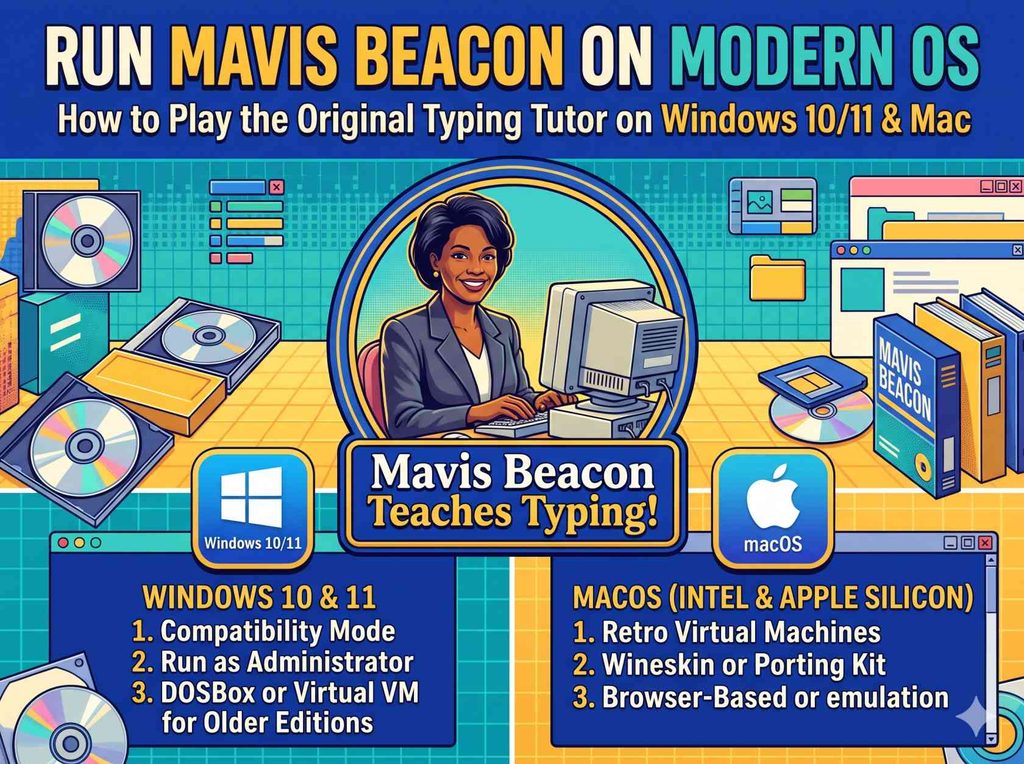
Many users want to bring back the original Mavis Beacon experience on a modern computer.
The main challenge is compatibility. Older editions were built for operating systems such as Windows 3.1 and Windows 95.
Important correction: Mavis Beacon Version 8 was not simply an MS-DOS game. Its published system specifications list Windows 3.1 and Windows 95 versions that run over MS-DOS 5.0 or later.
This is why opening its old installer directly on Windows 11 may fail.
Setting Up DOSBox for Mavis Beacon Version 8
DOSBox is an emulator that recreates an older DOS environment. It can help run legacy software, but the correct setup depends on your Mavis Beacon edition.
DOSBox Staging supports Windows 3.1. It does not support Windows 95 or Windows 98 as guest operating systems.
For the Windows 3.1 edition of Mavis Beacon Version 8, use this general setup:
Step 1: Get the emulator
Download DOSBox Staging from its official website.
Step 2: Obtain your original software
You need a legitimate copy of the Mavis Beacon installation media. You may also need a licensed copy of the supported DOS and Windows 3.1 installation media.
A ZIP or ISO file from an unknown download site may contain modified software or malware. Avoid cracked installers and anonymous mirrors.
Step 3: Prepare the emulator
Create a folder on your computer for the emulated hard drive. Keep the installation files in a separate folder.
Step 4: Install DOS and Windows 3.1
Use the DOSBox Staging documentation to set up the DOS environment and install Windows 3.1 from your licensed media.
Step 5: Mount the Mavis Beacon installation disc
Mount your legally obtained Mavis Beacon CD image or disc as a virtual CD-ROM drive.
Step 6: Run the installer
Open the virtual drive in Windows 3.1 and look for SETUP.EXE. Run it and follow the installation prompts.
Step 7: Start Mavis Beacon
After installation, open the program from the Windows 3.1 interface.
The exact installation steps depend on your media format and edition.
What About the Windows 95 Version?
For the Windows 95 release of Version 8, use DOSBox-X rather than DOSBox Staging.
DOSBox-X has a documented method for installing Windows 95 through a virtual hard drive and a legally obtained Windows 95 CD. Its setup is more advanced than a normal application installation.
After Windows 95 is running, you can mount your original Mavis Beacon disc and install the program inside that virtual system.
Do not assume that a simple DOSBox installation will run every Mavis Beacon release.
Can You Run Mavis Beacon on Mac?
Yes, an emulator may offer a route for some older editions.
DOSBox Staging provides macOS support and includes support for Windows 3.1. For a Windows 95-based Mavis Beacon edition, DOSBox-X is the more suitable route.
The setup will depend on your Mac’s processor, macOS version, and the Mavis Beacon edition you own.
Older software may not work perfectly. Sound, display size, mouse movement, and installation steps can need adjustment.
If you want to practise typing rather than recreate the old software, a current supported edition may be easier to use.
Browser-Based Emulation Through Internet Archive
Some historical software collections use browser-based emulation. This can let visitors run older programs without installing a full emulator locally.
However, I could not verify a stable, authorised, browser-playable Mavis Beacon Version 8 entry on the Internet Archive.
Be careful with websites offering free downloads of old commercial software. The term abandonware does not mean that copyright has expired or that anyone can distribute the program legally.
Use an original disc or a source that has clear permission to distribute the software. Do not download unknown EXE files just to play an old typing game.
Mavis Beacon Then and Now: Which Version Should You Choose?
The series changed over time. Different releases offered different games, lessons, operating system support, and reporting tools.
| Edition | Release Year | Main Platform | Key Features |
|---|---|---|---|
| Original Mavis Beacon | 1987 | Early home computers | Typing lessons and tests |
| Version 2.0 | 1991 | Macintosh and Amiga | Improved graphics and ten-key lessons |
| Version 8 | 1997 | Windows 3.1/95 | Classic mini-games and typing tests |
| Version 10 | 1999 | Windows 95/98 and NT | Updated typing instruction and games |
| Version 15 | 2002 | Windows | New lessons, tests, and reports |
| Version 18 | 2008 | Windows and Mac | More games and updated lessons |
| Classroom Edition | Later release | Modern Windows and Mac systems | Reports, progress tracking, and certificates |
The release dates and platform details are based on the published version history and game records.
Choose Version 8 if you want the classic Road Race, Chameleon Picnic, Shark Attack, and Check-Out Time experience.
Choose a modern Classroom Edition if you need current operating system support, structured reports, and teacher-managed progress tracking.
Frequently Asked Questions
Was Mavis Beacon a Real Person?
No. Mavis Beacon was a fictional typing instructor created by Software Toolworks. Her image was based on Haitian-born model Renée L’Espérance.
Who Was the Real Mavis Beacon Model?
The model was Renée L’Espérance. She worked at a Saks Fifth Avenue perfume counter before appearing in the software’s promotional photo shoot.
How Much Was Renée L’Espérance Paid?
According to Joe Abrams’ account reported by Mental Floss, she received $500 and a new suit for the photo shoot.
Can I Download Mavis Beacon Racing Game for Free?
Older editions are commercial software. You should use a legally obtained copy rather than an unauthorised download. The game is included in several classic Mavis Beacon releases.
Can Mavis Beacon Version 8 Run on Windows 11?
It cannot normally run directly as an old Windows 3.1 or Windows 95 application. You can explore DOSBox Staging for the Windows 3.1 edition or DOSBox-X for a Windows 95 virtual environment.
Does Mavis Beacon Give a Certificate After a Typing Test?
Some later Classroom Edition releases offer Certificates of Accomplishment and Completion. The availability and printing rules depend on the edition. Do not assume Version 8 has the same system.
What Were the Most Popular Mavis Beacon Mini-Games?
Popular titles include Road Race, Check-Out Time, Chameleon Picnic, Shark Attack, Penguin Crossing, and Space Junk.
Final Thoughts: Why Mavis Beacon Teaches Typing Is Still Remembered
Mavis Beacon Teaches Typing became more than a keyboard training program. It helped make computer-based typing lessons feel personal and enjoyable.
Its fictional instructor became famous, while the real model behind the image remained largely out of public view. The Road Race, Shark Attack, Chameleon Picnic, and supermarket checkout games gave students a reason to keep practising.
Today, the software is a piece of computer history. You can still explore older editions through compatible emulation, provided you have the right software media and follow the operating system requirements.
For anyone who used Mavis Beacon at school, opening the old typing games can bring back memories. For new learners, the main lesson remains useful: practise regularly, focus on accuracy, and build speed through steady work.
Useful official resources: DOSBox Staging, DOSBox-X Windows 95 guide, and Mavis Beacon Classroom Edition documentation.